AIKANJIA · CAMERA SOURCING
Dual-lens indoor camera · QD16 (card p08-r4)
Duplicate printed code: QD16 appears on multiple catalogue cards. This page identifies brochure card p08-r4 only; the card reference is a site locator, not a factory order code. Include this card reference and photo in your enquiry and confirm the unique ordering reference before purchase.
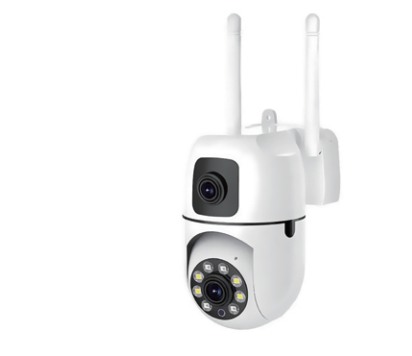
Dual-lens indoor camera in the BEKCAM-brand camera catalogue supplied through Aikanjia.
| Printed model code | QD16 |
|---|---|
| Brochure card reference | p08-r4 |
| Power | DC5V |
| Connection | WiFi; confirm the selected version. |
| Lens layout | Dual-lens layout listed in the catalogue; confirm the views available together in the selected version. |
| Lens marking | The card lists “4mm lens F1.0”. Confirm the lens specification and field of view for the ordered version. |
| Resolution wording | Printed as “200W+200W”; this shorthand is not a verified pixel-resolution specification. Confirm the pixel dimensions for every image stream. |
| Power marking | Printed power marking: “DC 5V”. Confirm the input, connector and supplied power equipment before installation. |
| Network selection | The card lists “Supports Wifi”. Confirm wireless setup and the selected version before ordering. |
| Listed functions | The card lists remote view, humanoid detection, two-way audio and “H.265+storage”. Request a sample demonstration and confirm recording media, storage limits and any service charges. |
Price on request. Include the brochure card reference and photo; confirm the unique factory ordering reference in the written quotation.
Ask for current documents for the exact configuration and destination. No model-specific market approval is asserted here.
Document scope and readable copies